

MCP Server
The StealThis MCP server runs at https://mcp.stealthis.dev/mcp and exposes the full resource catalog (2,000+ components, animations, pages and design systems) via the Model Context Protocol. It is free, public, and requires no API key.
Landing page: mcp.stealthis.dev has a quick visual setup guide and copy-paste prompts. A use-case build log shows real workflows end to end.
Connect from claude.ai (web & desktop)
Connectors on claude.ai and Claude Desktop are remote — nothing runs on your machine.
- Copy the server URL:
https://mcp.stealthis.dev/mcp - Open Settings → Connectors → Add custom connector (that link opens the modal directly).
- Name it Stealthis, paste the URL, and click Add. Leave the OAuth fields empty — no authentication is needed.
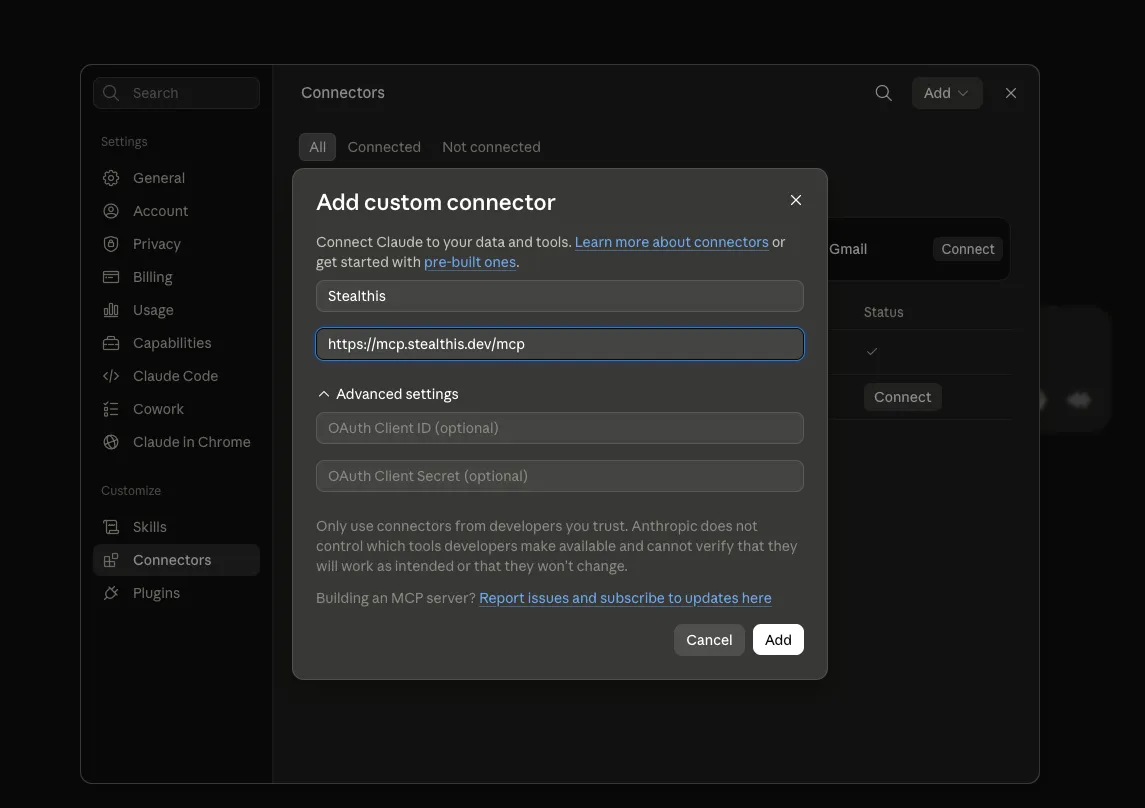
The five StealThis tools are now available in every conversation.
Connect from Claude Code
One command:
claude mcp add stealthis --transport http https://mcp.stealthis.dev/mcpConnect from Cursor (or any JSON-configured client)
{ "mcpServers": { "stealthis": { "type": "http", "url": "https://mcp.stealthis.dev/mcp" } }}Tools
The server exposes five MCP tools:
| Tool | Arguments | Returns |
|---|---|---|
list_resources | category?, difficulty? (easy/med/hard), tech? | Catalog metadata for matching resources |
get_resource | slug | Full metadata for one resource, incl. available snippets and links |
get_snippet | slug, target (html, css, js, react, next, vue, svelte, astro, …) | The actual source code |
search | query | Full-text search across titles, descriptions, tags and tech |
get_lab | slug | The full-screen live demo URL on lab.stealthis.dev |
Example prompts once connected:
- “Find me a scroll animation from StealThis”
- “Get the React snippet for the magnetic-button resource”
- “Build a gym landing page using StealThis snippets”
MCP endpoint (Streamable HTTP)
The primary transport is JSON-RPC over POST /mcp (MCP Streamable HTTP). Handled methods: initialize, notifications/initialized, ping, tools/list, tools/call.
# List the toolscurl -s https://mcp.stealthis.dev/mcp \  -H "Content-Type: application/json" \  -d '{"jsonrpc":"2.0","id":1,"method":"tools/list"}'
# Call a toolcurl -s https://mcp.stealthis.dev/mcp \  -H "Content-Type: application/json" \  -d '{"jsonrpc":"2.0","id":2,"method":"tools/call","params":{"name":"search","arguments":{"query":"parallax"}}}'
REST endpoints (no MCP client needed)
The same tools are available as plain HTTP GET routes:
GET /tools/list_resources
Optional query params: category, difficulty, tech.
GET /tools/list_resources?category=web-animations&difficulty=easyGET /tools/get_resource/:slug
GET /tools/get_resource/scroll-fadeGET /tools/get_snippet/:slug/:target
GET /tools/get_snippet/scroll-fade/reactGET /tools/search?q=
GET /tools/search?q=parallax+scroll+effectGET /tools/get_lab/:slug
GET /tools/get_lab/scroll-fadeA machine-readable server summary lives at GET /api.
Local development
The hosted server is what connectors use — local setup only matters if you’re hacking on the worker itself:
bun run dev:mcp